Introduction
Enterprise web applications are evolving beyond traditional desktop browsers. Organizations now expect business applications to perform consistently across desktops, tablets, and smartphones while maintaining fast response times and manageable deployment processes. As JavaScript frameworks, CSS libraries, and client-side functionality continue to grow, optimizing front-end performance has become just as important as optimizing server-side code.
ASP.NET MVC 4 addresses these changing requirements by introducing built-in performance optimization features, stronger mobile support, and a more modern development experience. Rather than requiring third-party utilities for common optimization tasks, MVC 4 integrates bundling and minification directly into the framework while also improving support for device-specific user interfaces.
For enterprise architects, ASP.NET MVC 4 represents another step in Microsoft's transition toward standards-based web development while preserving the productivity and tooling that have made the ASP.NET platform popular in business environments.
Industry Background
During the past several years, web development has shifted significantly toward client-side technologies. Applications increasingly depend on JavaScript libraries, CSS frameworks, AJAX interactions, and REST-based services.
At the same time, smartphones and tablets have introduced new requirements for responsive user interfaces and device-aware application design. Organizations can no longer assume users will access business applications exclusively from desktop computers.
Developers therefore require frameworks capable of:
- ◆Optimizing client-side resources
- ◆Supporting multiple device categories
- ◆Reducing application latency
- ◆Simplifying deployment
- ◆Encouraging standards-based development
ASP.NET MVC 4 attempts to address these needs while remaining compatible with existing ASP.NET infrastructure.
The Business Problem
Large enterprise applications frequently suffer from several front-end performance challenges:
- ◆Excessive JavaScript requests
- ◆Multiple CSS downloads
- ◆Increased page load times
- ◆Separate mobile websites
- ◆Complex deployment processes
- ◆Inconsistent browser experiences
Without optimization, modern web applications may require dozens of HTTP requests before becoming fully interactive.
ASP.NET MVC 4 introduces built-in mechanisms to reduce this overhead.
Understanding ASP.NET MVC 4
ASP.NET MVC 4 builds upon the Model-View-Controller architectural pattern introduced in earlier MVC releases while extending the framework with features designed for modern web applications.
Major additions include:
- ◆Bundling and minification
- ◆Mobile display modes
- ◆ASP.NET Web API
- ◆Updated project templates
- ◆Improved HTML5 support
- ◆Better development tooling in Visual Studio 2012
These enhancements enable developers to build faster, cleaner, and more maintainable enterprise applications.
Core Architecture
ASP.NET MVC 4 continues using the familiar MVC architecture.
| Component | Responsibility |
|---|---|
| Model | Business logic and data |
| View | User interface rendering |
| Controller | Request processing |
| Routing | URL mapping |
| Razor View Engine | Dynamic page generation |
| Bundling Framework | Combines static resources |
| Minification Engine | Reduces resource size |
| Display Modes | Device-specific rendering |
| Web API | HTTP service development |
The framework remains highly extensible while introducing several new infrastructure components.
Bundling and Minification
// Configuring CSS/JS bundling in BundleConfig.cs
public class BundleConfig
{
    public static void RegisterBundles(BundleCollection bundles)
    {
        bundles.Add(new ScriptBundle("~/bundles/modernizr").Include(
                    "~/Scripts/modernizr-*"));

        bundles.Add(new StyleBundle("~/Content/css").Include(
                    "~/Content/bootstrap.css",
                    "~/Content/site.css"));

        // Enables optimization (bundling and minification) in production
        BundleTable.EnableOptimizations = true;
    }
}
One of the most valuable additions in MVC 4 is built-in bundling and minification.
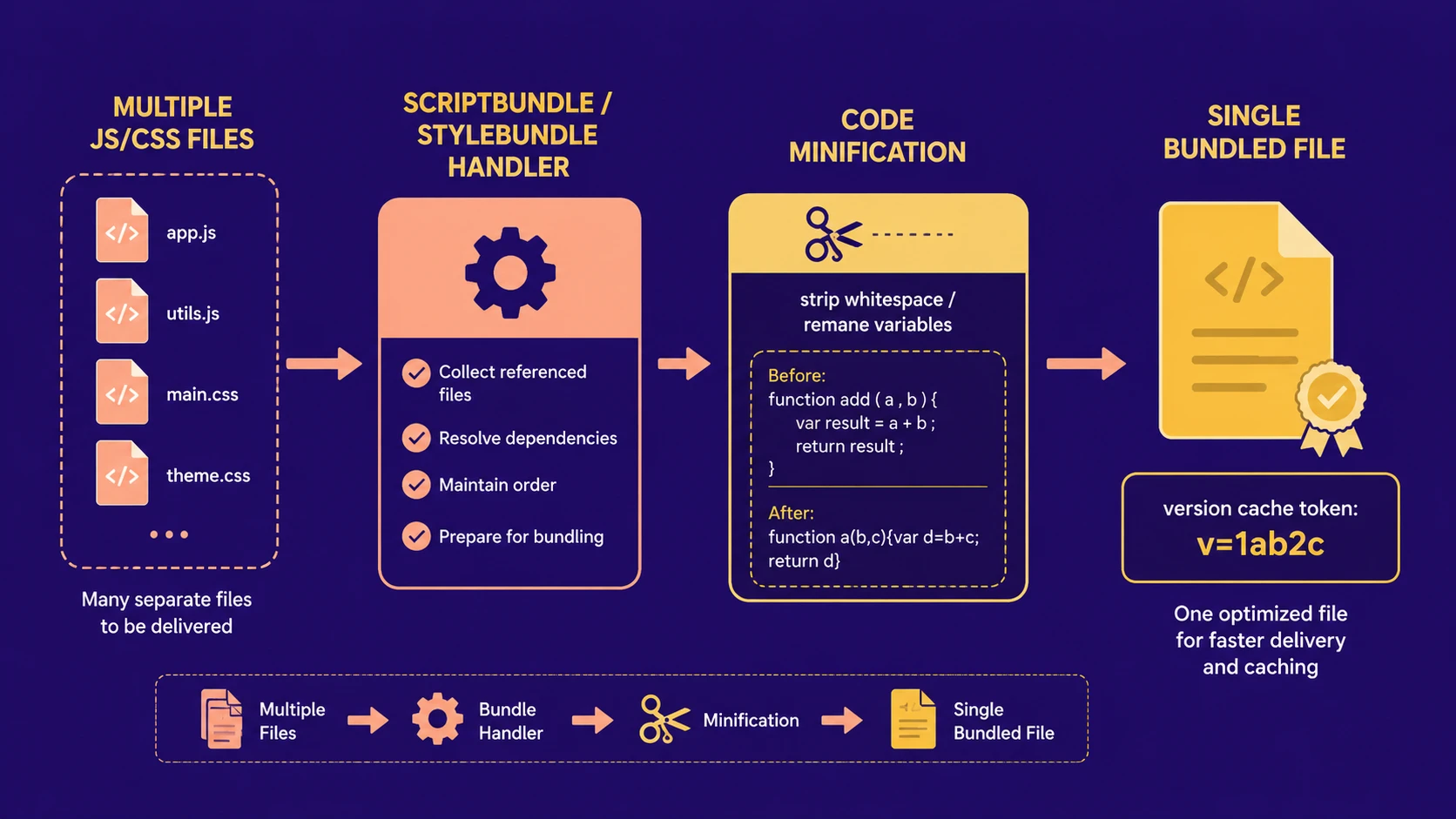
Traditionally, browsers download every JavaScript and CSS file individually. Applications containing numerous scripts often require many HTTP requests before rendering can begin.
Bundling combines multiple files into a smaller number of resources.
Minification removes unnecessary whitespace, comments, and formatting from JavaScript and CSS files, reducing download size.
Together these optimizations provide:
- ◆Fewer HTTP requests
- ◆Reduced bandwidth usage
- ◆Faster page loading
- ◆Simplified resource management
- ◆Improved production deployment
Because these capabilities are integrated into the framework, organizations no longer need separate build tools for basic optimization scenarios.
Mobile Display Modes
Mobile device usage continues growing throughout enterprise environments.
MVC 4 introduces display modes that allow developers to render different views depending on the requesting device.
For example:
- ◆Desktop users may receive a traditional interface.
- ◆Smartphone users can receive an optimized layout.
- ◆Tablet interfaces may present additional functionality.
This approach enables organizations to reuse controllers and business logic while tailoring presentation for different device categories.
ASP.NET Web API
Another major addition is ASP.NET Web API.
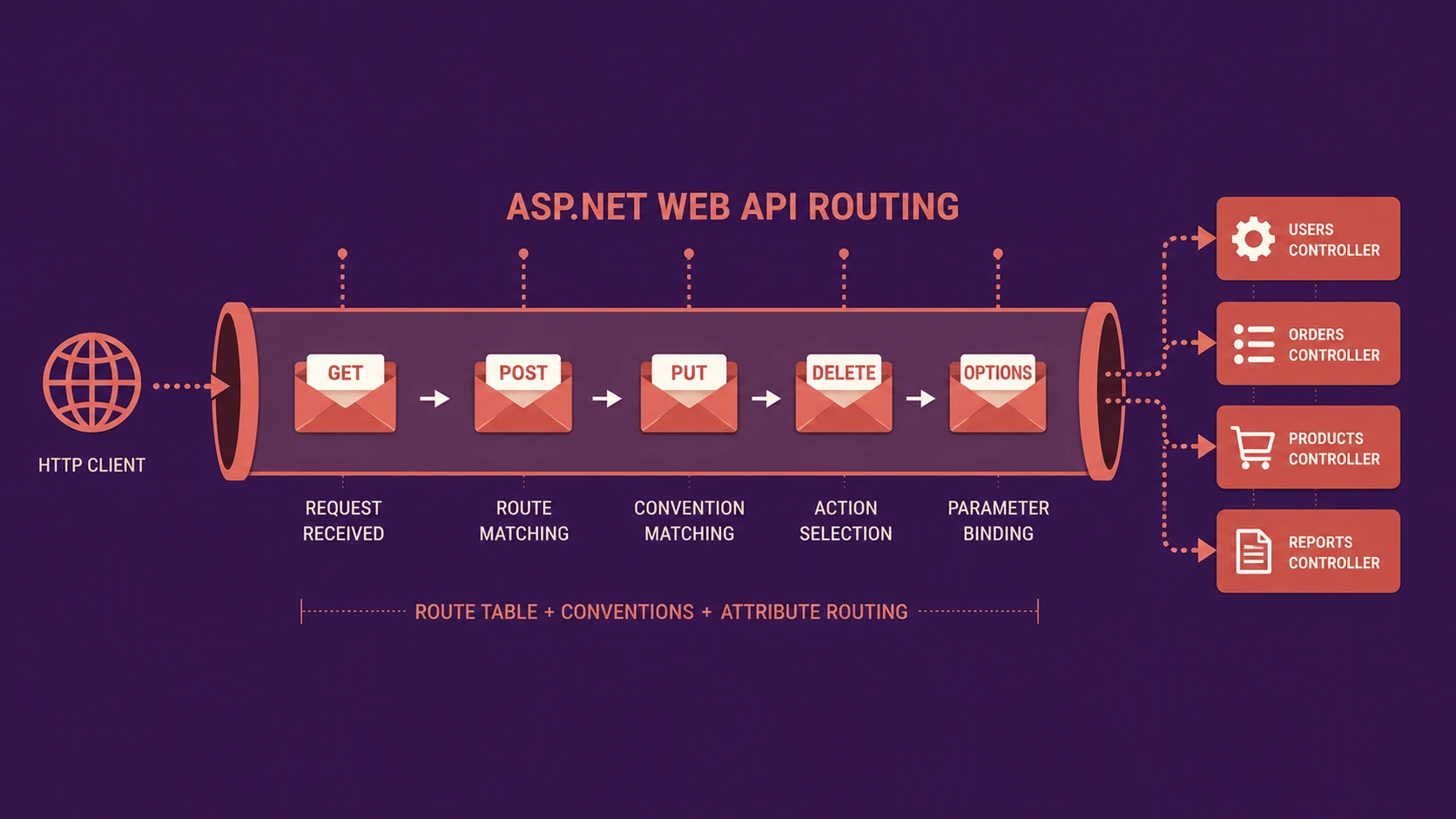
While ASP.NET MVC focuses primarily on generating HTML, Web API provides a framework for building HTTP-based services suitable for browsers, mobile applications, and other clients.
Enterprise applications increasingly expose business functionality through REST-style services, making Web API an important architectural addition.
Potential uses include:
- ◆Mobile back-end services
- ◆AJAX endpoints
- ◆Business integration APIs
- ◆Cloud-connected applications
- ◆Third-party integrations
How ASP.NET MVC 4 Works
A typical request follows this workflow:
- 1.Browser submits an HTTP request.
- 2.Routing selects the appropriate controller.
- 3.Controller processes business logic.
- 4.Model retrieves required data.
- 5.Display mode determines the appropriate view.
- 6.Razor generates HTML.
- 7.Bundled JavaScript and CSS are delivered efficiently.
- 8.Browser renders the optimized application.
Model-View-Controller processing pipeline resolving client requests into dynamic pages.
This workflow remains familiar to existing MVC developers while incorporating new performance improvements.
Enterprise Use Cases
ASP.NET MVC 4 is suitable for a wide range of enterprise applications.
Corporate Portals
Large internal applications benefit from improved front-end performance.
Customer Self-Service Systems
Mobile display modes improve accessibility across multiple device categories.
REST Services
Web API enables reusable business services supporting browsers and mobile applications.
Business Dashboards
Optimized resource delivery improves responsiveness for data-intensive interfaces.
Software as a Service
Cloud-hosted enterprise applications benefit from reduced bandwidth consumption and simplified deployment.
Performance Considerations
Bundling and minification primarily improve client-side performance.
Expected benefits include:
- ◆Reduced HTTP requests
- ◆Smaller JavaScript payloads
- ◆Faster CSS delivery
- ◆Better browser caching
- ◆Lower bandwidth consumption
- ◆Improved application responsiveness
Developers should continue optimizing server-side code because front-end improvements alone cannot resolve inefficient business logic.
Security Considerations
MVC 4 continues supporting established ASP.NET security capabilities.
Enterprise applications should implement:
- ◆Authentication
- ◆Authorization
- ◆Anti-forgery validation
- ◆Secure session management
- ◆Input validation
- ◆HTTPS deployment
Developers exposing Web API services should also secure endpoints appropriately according to organizational security policies.
Scalability
ASP.NET MVC's stateless request model remains well suited for scalable web applications.
Organizations can improve scalability through:
- ◆Load balancing
- ◆Output caching
- ◆Resource bundling
- ◆Efficient controller design
- ◆Optimized database access
- ◆Service-oriented architecture using Web API
Separating presentation, business logic, and service layers simplifies long-term application growth.
Best Practices
Organizations adopting MVC 4 should consider the following recommendations.
- ◆Enable bundling in production environments.
- ◆Organize JavaScript into logical bundles.
- ◆Minimize duplicate CSS resources.
- ◆Design reusable controllers.
- ◆Separate business logic from presentation.
- ◆Use strongly typed Razor views.
- ◆Test mobile display modes across devices.
- ◆Build reusable Web API services where appropriate.
Common Mistakes
| Mistake | Enterprise Impact |
|---|---|
| Disabling bundling in production | Slower page loading |
| Mixing business logic into views | Reduced maintainability |
| Ignoring mobile testing | Poor user experience |
| Creating oversized JavaScript bundles | Longer downloads |
| Duplicate CSS resources | Increased maintenance |
| Exposing unsecured APIs | Security risks |
Following MVC architectural principles remains essential despite the framework's additional capabilities.
Technology Comparison
| Capability | ASP.NET MVC 3 | ASP.NET MVC 4 |
|---|---|---|
| Bundling | External Solutions | Built-In |
| Minification | External Solutions | Built-In |
| Mobile Display Modes | Limited | Enhanced |
| ASP.NET Web API | No | Yes |
| Visual Studio 2012 Support | Limited | Native |
| HTML5 Templates | Basic | Improved |
MVC 4 focuses primarily on performance optimization and modern application architecture rather than introducing a radically different programming model.
Adoption Strategy
Organizations planning migration to MVC 4 should proceed incrementally.
Recommended steps include:
- 1.Upgrade development environments.
- 2.Validate existing MVC applications.
- 3.Introduce bundling gradually.
- 4.Optimize client-side resources.
- 5.Evaluate mobile display modes.
- 6.Introduce Web API where service interfaces are required.
- 7.Perform performance benchmarking.
- 8.Deploy after comprehensive compatibility testing.
This phased approach minimizes migration risk while allowing teams to adopt new framework capabilities progressively.
Limitations
Although MVC 4 introduces meaningful improvements, organizations should recognize several considerations.
- ◆Existing applications may require updates to leverage bundling.
- ◆Mobile-specific views increase testing requirements.
- ◆Web API introduces additional architectural decisions.
- ◆Front-end optimization cannot replace efficient application design.
- ◆Legacy browser compatibility should continue to be evaluated.
Organizations should therefore treat MVC 4 as an opportunity to modernize application architecture rather than simply upgrading framework versions.
Looking Ahead
From the perspective of November 2012, ASP.NET MVC 4 demonstrates Microsoft's continued commitment to standards-based web development and enterprise application modernization. Features such as built-in bundling, minification, mobile display modes, and ASP.NET Web API reflect the industry's increasing emphasis on performance, mobility, and service-oriented architecture.
As web applications continue evolving toward richer client experiences and broader device support, frameworks that combine productivity, performance optimization, and flexible architectural patterns are expected to play an increasingly important role in enterprise software development. ASP.NET MVC 4 provides a strong foundation for organizations preparing for that transition while preserving compatibility with the broader ASP.NET ecosystem.