Introduction
Modern enterprise applications are expected to perform more work than ever before. Web applications simultaneously serve thousands of users, desktop applications communicate continuously with remote services, and enterprise systems increasingly depend on cloud platforms, RESTful APIs, distributed databases, and network-based resources. In many of these scenarios, application responsiveness depends not on processor speed but on efficiently managing waiting time.
Historically, asynchronous programming in the .NET ecosystem has been possible through technologies such as the Asynchronous Programming Model (APM), the Event-based Asynchronous Pattern (EAP), worker threads, callbacks, and the Task Parallel Library (TPL). While these approaches provide powerful capabilities, they often result in code that is difficult to understand, maintain, and debug.
With the release of C# 5.0 and the .NET Framework 4.5, Microsoft introduces async and await, language features that significantly simplify asynchronous programming while building upon the Task-based Asynchronous Pattern (TAP). Rather than forcing developers to manage complex callback chains or manually coordinate asynchronous operations, the compiler now provides language support that enables asynchronous code to resemble familiar sequential programming.
For enterprise architects and development teams building scalable applications, async and await represent one of the most important enhancements introduced in the .NET platform in recent years.
Industry Background
Software systems are becoming increasingly connected. Applications frequently interact with web services, relational databases, message queues, file systems, and remote business systems. These operations often spend far more time waiting for external resources than executing processor-intensive calculations.
Traditional synchronous programming causes execution threads to remain idle while waiting for these external operations to complete. In server applications, this can reduce overall throughput. In desktop applications, it frequently results in unresponsive user interfaces.
The .NET ecosystem has gradually evolved to address these challenges. The Task Parallel Library introduced a more structured approach to concurrency, while C# 5.0 extends these capabilities through first-class language support for asynchronous programming.
The Business Problem
Enterprise software frequently performs operations that involve waiting rather than computation.
Typical examples include:
- ◆Database queries
- ◆HTTP requests
- ◆File operations
- ◆Web service communication
- ◆Network transfers
- ◆Cloud storage access
- ◆Email processing
When these operations execute synchronously, application responsiveness suffers.
Organizations commonly encounter:
- ◆Blocked user interfaces
- ◆Reduced web server scalability
- ◆Thread pool exhaustion
- ◆Complex callback implementations
- ◆Difficult error handling
- ◆Challenging debugging scenarios
Async and await address these issues by allowing applications to release execution threads while waiting for external operations to complete.
Understanding Async and Await
Async and await are language keywords introduced in C# 5.0.
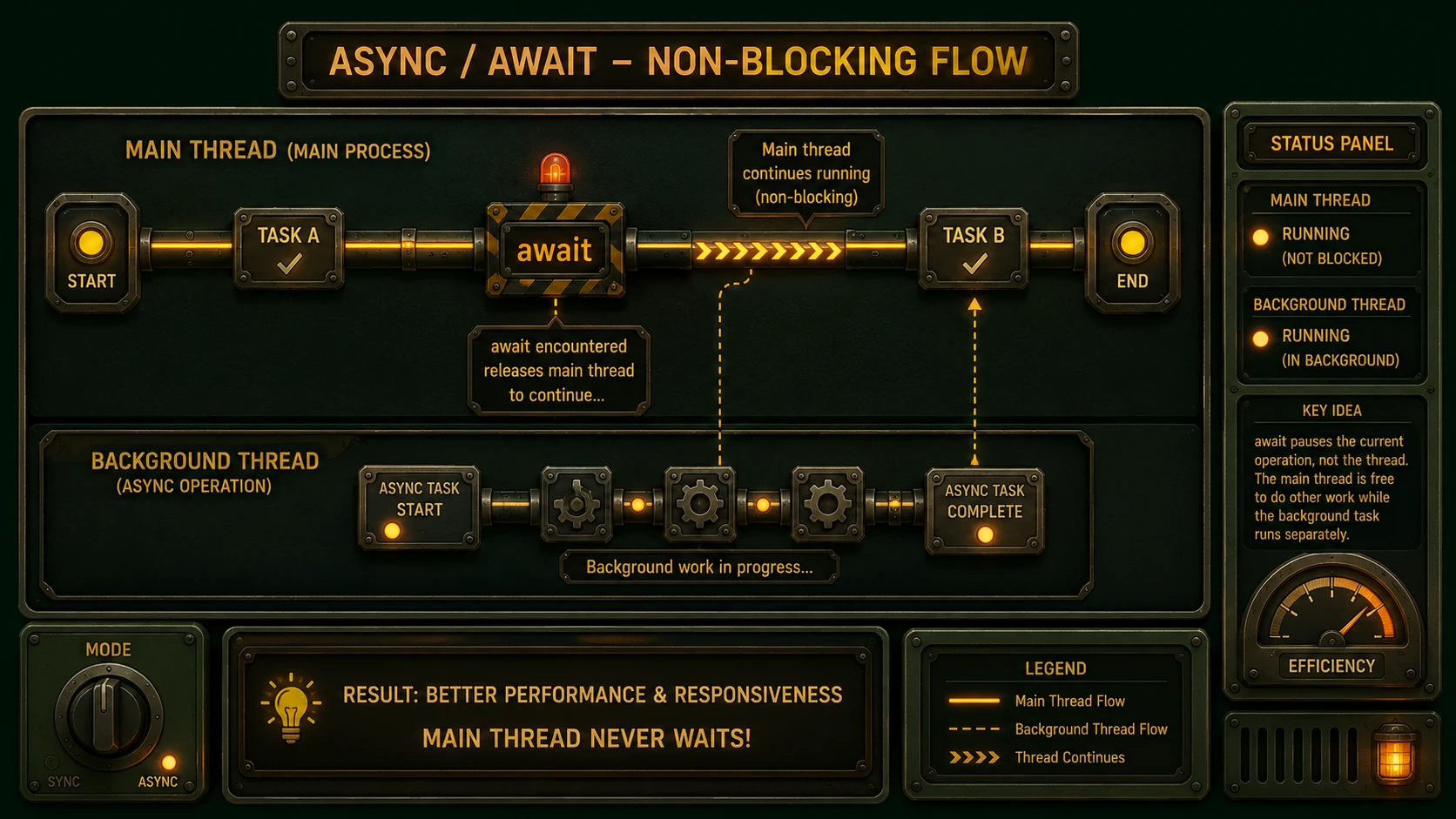
An asynchronous method is declared using the async modifier and typically returns a Task or Task<TResult>. Within that method, the await keyword suspends execution until an asynchronous operation completes without blocking the underlying thread.
From the developer's perspective, the code appears sequential even though execution is asynchronous.
This programming model dramatically improves readability while preserving efficient resource utilization.
Core Architecture
The asynchronous programming model combines compiler support with the .NET runtime.
| Component | Responsibility |
|---|---|
| async Keyword | Declares asynchronous methods |
| await Keyword | Suspends execution until completion |
| Task | Represents asynchronous operations |
| Task<TResult> | Represents operations returning values |
| Compiler | Generates asynchronous state machines |
| .NET Runtime | Schedules and resumes execution |
Rather than introducing a completely new execution model, async and await build upon the existing Task Parallel Library.
How Async and Await Work
When the compiler encounters an await expression, it transforms the method into a state machine.
The general execution flow is:
- 1.An asynchronous method begins execution.
- 2.An asynchronous operation is initiated.
- 3.Execution reaches an await expression.
- 4.Control returns to the caller while the operation continues.
- 5.The awaited operation completes.
- 6.The runtime schedules continuation of the remaining method.
- 7.Results become available to subsequent statements.
This transformation occurs automatically during compilation, allowing developers to write significantly cleaner code.
The Task-based Asynchronous Pattern
// Legacy APM (Asynchronous Programming Model) Callback approach
public void LoadDataLegacy()
{
    var request = WebRequest.Create("https://api.shivamitcs.com/data");
    request.BeginGetResponse(new AsyncCallback(FinishLoad), request);
}

private void FinishLoad(IAsyncResult result)
{
    var request = (WebRequest)result.AsyncState;
    using (var response = request.EndGetResponse(result))
    {
        // Process response and update UI on main thread
    }
}

// Modern C# 5.0 Task-based async/await approach
public async Task LoadDataAsync()
{
    var client = new HttpClient();
    string result = await client.GetStringAsync("https://api.shivamitcs.com/data");
    // Process result directly, context captured automatically
}
The Task-based Asynchronous Pattern (TAP) serves as the foundation for async and await.
A Task represents work that may complete in the future.
Unlike earlier asynchronous programming models that relied heavily on callbacks or events, Task objects provide a consistent abstraction for representing asynchronous operations.
This consistency simplifies composition, error handling, and code reuse.
Improving Desktop Application Responsiveness
Windows Presentation Foundation (WPF) and Windows Forms applications often perform lengthy operations such as downloading data, reading files, or querying remote services.
Using synchronous methods can temporarily freeze the user interface until operations complete.
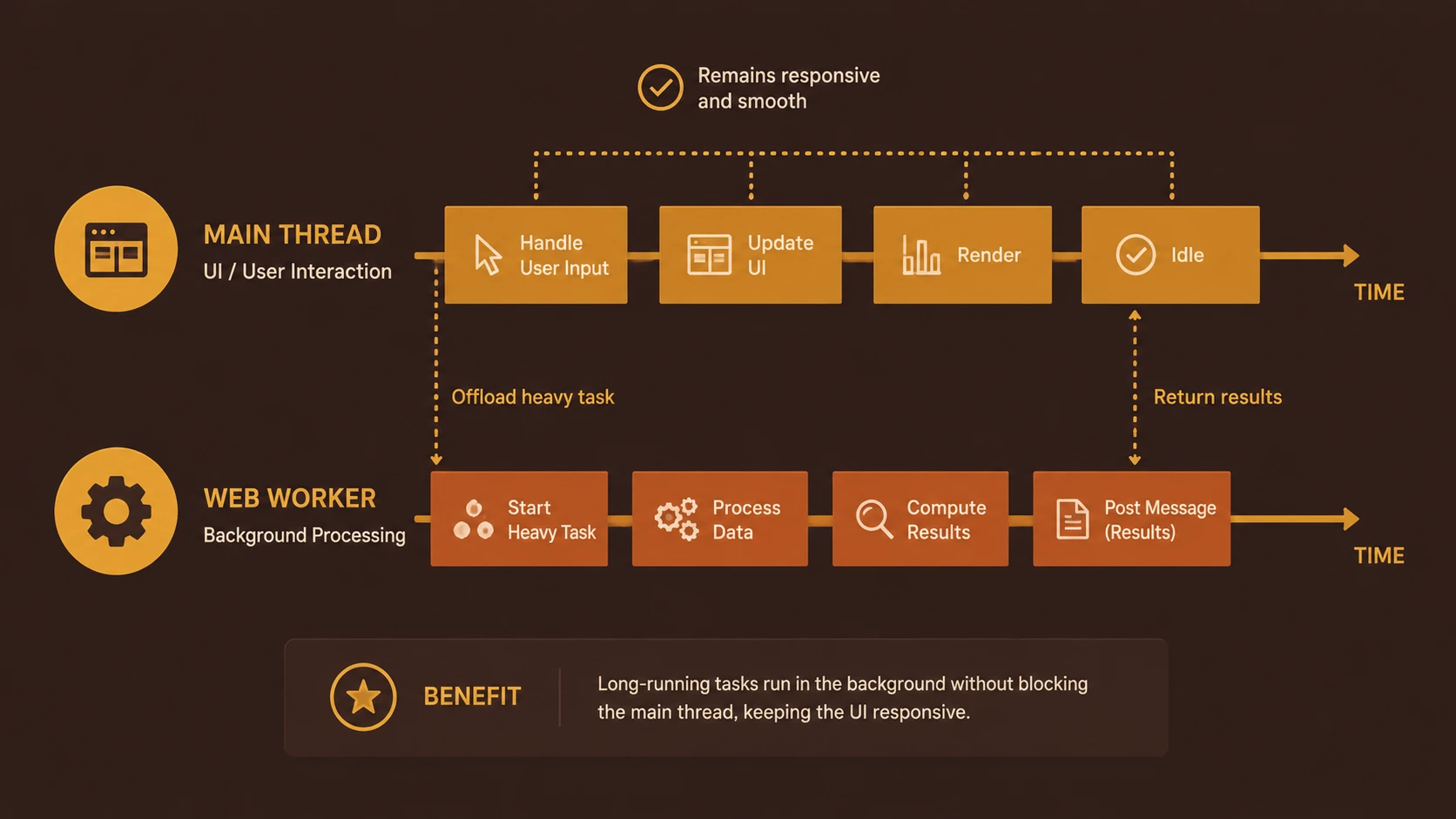
Async and await allow these applications to remain responsive while background operations continue.
Users benefit from smoother interaction without requiring developers to manually manage background threads for many common scenarios.
Improving ASP.NET Scalability
ASP.NET applications also benefit from asynchronous programming.
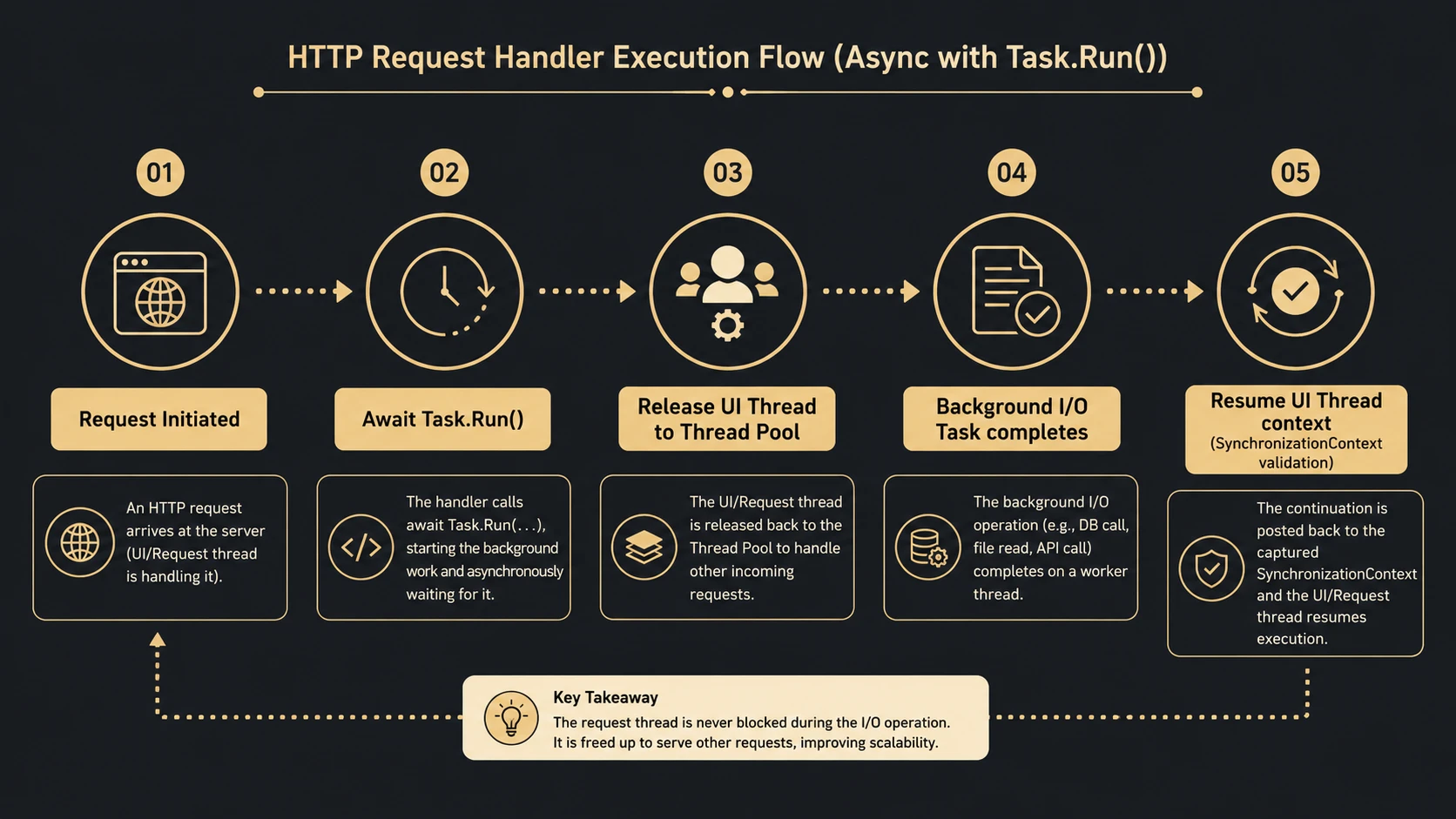
When web requests wait for external services, synchronous execution ties up valuable request-processing threads.
Asynchronous request handling allows these threads to become available for other incoming requests while external operations continue.
For high-concurrency web applications, this can improve server utilization and request throughput.
Exception Handling
One advantage of async and await is that exception handling remains familiar.
System architecture diagram and conceptual workflow layout for C# 5.0 and .NET 4.5.
Developers can continue using structured try-catch blocks around awaited operations.
Exceptions occurring during asynchronous execution are propagated through the associated Task and can be handled using existing language constructs.
This improves maintainability compared with callback-based error handling.
Enterprise Use Cases
Async and await support numerous enterprise scenarios.
| Scenario | Benefit |
|---|---|
| ASP.NET applications | Improved scalability |
| WPF desktop software | Responsive user interfaces |
| Windows Forms applications | Non-blocking operations |
| REST API clients | Efficient network communication |
| Database access | Better resource utilization |
| Cloud services | Improved throughput |
| File processing | Responsive execution |
| Enterprise integration | Efficient service communication |
Organizations building connected applications are likely to benefit most from asynchronous programming.
Performance Considerations
Async programming is most beneficial for operations that spend significant time waiting on external resources.
Examples include:
- ◆Network communication
- ◆Database access
- ◆File input/output
- ◆Web service requests
CPU-intensive algorithms generally require different optimization techniques and should not automatically be converted to asynchronous implementations.
Architects should evaluate application workloads before introducing async methods broadly.
Security Considerations
Async and await primarily affect execution flow rather than application security.
Organizations should continue applying established security practices, including:
- ◆Input validation
- ◆Authentication
- ◆Authorization
- ◆Secure communication using HTTPS
- ◆Exception logging
- ◆Proper resource cleanup
Asynchronous execution should not bypass existing security policies.
Scalability
One of the strongest advantages of asynchronous programming is improved scalability for I/O-bound workloads.
Applications can:
- ◆Process more concurrent requests
- ◆Improve server utilization
- ◆Reduce blocked threads
- ◆Increase overall responsiveness
- ◆Better utilize system resources
For enterprise web applications, efficient thread management often becomes increasingly important as user traffic grows.
Best Practices
Organizations adopting async and await should establish development guidelines.
Recommended practices include:
- ◆Use asynchronous APIs consistently throughout the call chain.
- ◆Reserve async methods for operations that benefit from asynchronous execution.
- ◆Return Task or Task<TResult> whenever appropriate.
- ◆Handle exceptions explicitly.
- ◆Avoid unnecessary blocking operations.
- ◆Document asynchronous behavior.
- ◆Measure application performance before and after migration.
- ◆Review thread-safety requirements carefully.
Consistent development practices improve long-term maintainability.
Common Mistakes
Early adopters should avoid several implementation pitfalls.
Common mistakes include:
- ◆Blocking on asynchronous operations.
- ◆Introducing async methods without corresponding asynchronous dependencies.
- ◆Assuming asynchronous execution automatically improves CPU performance.
- ◆Mixing synchronous and asynchronous programming unnecessarily.
- ◆Ignoring exception handling.
- ◆Overusing asynchronous methods where no waiting occurs.
Successful adoption depends upon understanding when asynchronous programming provides meaningful benefits.
Technology Comparison
| Capability | Traditional Asynchronous Patterns | C# 5.0 Async/Await |
|---|---|---|
| Readability | Moderate | Excellent |
| Callback Management | Manual | Compiler-managed |
| Exception Handling | More complex | Familiar try-catch model |
| Task Integration | Varies | Native |
| Compiler Support | Limited | Full language support |
| Code Maintainability | Moderate | Improved |
Async and await simplify asynchronous programming while preserving compatibility with the Task-based Asynchronous Pattern.
Adoption Strategy
Organizations should adopt asynchronous programming incrementally.
A recommended approach includes:
- 1.Identify I/O-bound application components.
- 2.Introduce asynchronous APIs where supported.
- 3.Migrate service communication layers.
- 4.Validate performance improvements through testing.
- 5.Establish coding standards for asynchronous development.
- 6.Expand adoption across additional application modules.
Incremental migration reduces risk while allowing development teams to gain familiarity with the new programming model.
Limitations
Although async and await significantly improve developer productivity, several considerations remain.
Current limitations include:
- ◆Existing synchronous libraries may limit adoption.
- ◆Asynchronous programming introduces new debugging considerations.
- ◆CPU-bound work may require alternative parallel programming techniques.
- ◆Teams should understand the Task-based Asynchronous Pattern before widespread deployment.
Technology adoption should be driven by application requirements rather than language features alone.
Looking Ahead
C# 5.0 and the .NET Framework 4.5 introduce one of the most significant advancements in the evolution of the C# language. By integrating asynchronous programming directly into the language, Microsoft has reduced much of the complexity historically associated with non-blocking operations while preserving the power of the Task Parallel Library.
As of December 2012, organizations developing desktop software, ASP.NET applications, cloud-connected systems, and enterprise integration platforms should carefully evaluate async and await as part of their application architecture. The new programming model offers a practical path toward more responsive user experiences, improved server scalability, and cleaner application code without requiring developers to abandon familiar C# programming techniques.