
Introduction
For nearly a decade, enterprise infrastructure planning has revolved around purchasing physical servers, forecasting capacity months in advance, negotiating colocation contracts, and maintaining dedicated operations teams. While virtualization has significantly improved hardware utilization, organizations are still required to invest heavily in infrastructure before applications ever reach production.
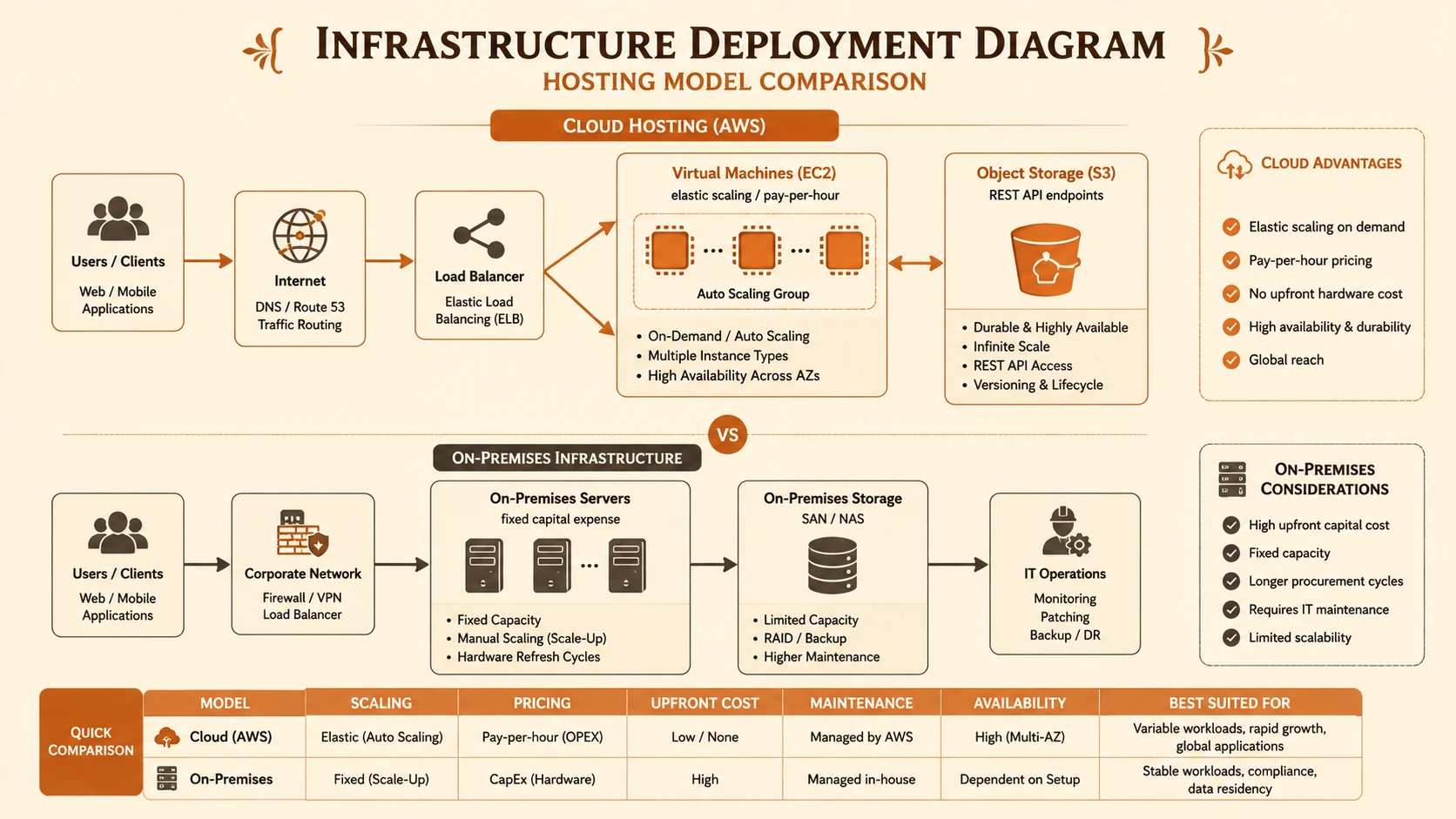
Cloud computing is beginning to challenge this traditional model. Amazon Web Services (AWS), particularly Amazon Elastic Compute Cloud (EC2) and Amazon Simple Storage Service (S3), offers organizations the opportunity to provision computing resources on demand rather than purchasing hardware upfront.
As of May 2010, many enterprises are cautiously evaluating whether cloud infrastructure is mature enough for production workloads. Questions around security, compliance, performance, reliability, and operational control remain active discussion topics. However, the financial model alone is attracting considerable attention.
Instead of paying for peak capacity regardless of utilization, organizations can pay only for the resources they consume. This shift has the potential to fundamentally redefine hosting economics.
This article examines how EC2 and S3 are influencing enterprise infrastructure decisions, compares cloud hosting with traditional environments, and outlines practical adoption strategies for organizations evaluating cloud infrastructure today.
Understanding the Traditional Hosting Model
Before cloud infrastructure, deploying an enterprise application generally involved several capital-intensive steps:
- ◆Purchasing physical servers
- ◆Procuring storage hardware
- ◆Ordering networking equipment
- ◆Leasing rack space
- ◆Configuring operating systems
- ◆Building disaster recovery capabilities
- ◆Hiring infrastructure administrators
Capacity planning often required predicting demand six to eighteen months in advance. Underestimating demand risked outages, while overestimating resulted in expensive underutilized hardware.
A typical enterprise deployment involved:
| Component | Traditional Deployment |
|---|---|
| Web Servers | Physical hardware |
| Application Servers | Dedicated machines |
| Storage | SAN or NAS |
| Backup | Tape libraries |
| Network | Managed switches and firewalls |
| Scaling | Purchase additional hardware |
While virtualization technologies such as VMware have improved efficiency inside data centers, they do not eliminate hardware acquisition or operational management responsibilities.
Introducing Amazon EC2
Amazon Elastic Compute Cloud (EC2) enables organizations to launch virtual server instances on demand.
Instead of waiting weeks for hardware procurement, engineers can provision servers in minutes using preconfigured machine images.
Key capabilities include:
- ◆On-demand virtual servers
- ◆Multiple instance sizes
- ◆Elastic scaling
- ◆API-driven provisioning
- ◆Geographic deployment options
- ◆Pay-as-you-go pricing
For development teams, this dramatically reduces infrastructure lead times.
Instead of requesting hardware through procurement workflows, developers can launch temporary environments when needed and terminate them afterward.
Understanding Amazon S3
Amazon Simple Storage Service (S3) addresses another major infrastructure challenge: scalable object storage.
Traditional storage systems require careful capacity planning and expensive hardware expansion. S3 instead provides highly scalable online storage accessed through web APIs.
Potential enterprise use cases include:
- ◆Static website assets
- ◆Software downloads
- ◆Backup archives
- ◆Log storage
- ◆Media content
- ◆Document repositories
Because storage grows as data grows, organizations avoid purchasing excess capacity years in advance.
The Economics of Cloud Infrastructure
Perhaps the most significant change introduced by EC2 and S3 is the pricing model.
Traditional hosting requires significant capital expenditure.
Cloud infrastructure shifts much of this expense toward operational expenditure.
Instead of purchasing servers outright, organizations pay for:
- ◆Compute hours
- ◆Storage consumed
- ◆Data transfer
- ◆Additional cloud services
This model aligns infrastructure spending more closely with actual business activity.
Organizations launching new products no longer need to purchase hardware capable of supporting hypothetical future demand.
Comparing Traditional Hosting and AWS
| Area | Traditional Hosting | AWS EC2 + S3 |
|---|---|---|
| Initial Investment | High | Low |
| Hardware Procurement | Required | None |
| Scaling | Manual | Elastic |
| Server Provisioning | Days or Weeks | Minutes |
| Storage Expansion | Hardware Purchase | On Demand |
| Capacity Planning | Long-term | Incremental |
| Infrastructure Automation | Limited | API Driven |
| Cost Model | Capital Expense | Operational Expense |
The flexibility offered by cloud infrastructure enables organizations to experiment with new services without making long-term hardware commitments.
Architecture Considerations
Cloud adoption requires architects to rethink application design.
Applications originally built for fixed infrastructure often assume:
- ◆Static server identities
- ◆Persistent local storage
- ◆Manual deployments
- ◆Limited horizontal scaling
Cloud-native architectural thinking encourages:
- ◆Stateless application servers
- ◆Externalized storage
- ◆Automated provisioning
- ◆Load-balanced deployments
A simplified architecture might resemble:
Internet
    |
Load Balancer
    |
-------------------------
|       EC2 Instances    |
-------------------------
        |
Application Layer
        |
Database
        |
Amazon S3 (Static Assets & Backups)
Although many enterprises continue hosting databases internally, application tiers may increasingly benefit from elastic compute resources.
Enterprise Use Cases
Several workloads are particularly well suited for cloud infrastructure today.
Development and Testing
Development environments often remain idle outside business hours.
Launching temporary EC2 instances significantly reduces unnecessary infrastructure costs.
Public Websites
Marketing websites experience unpredictable traffic.
Elastic capacity helps organizations accommodate temporary demand spikes.
Software Distribution
S3 offers a practical solution for storing downloadable installers and product updates.
Backup Storage
Rather than expanding local storage arrays, backup archives can be maintained using cloud storage.
Seasonal Applications
Retail, education, and event-driven organizations frequently experience seasonal workload fluctuations.
Cloud infrastructure allows capacity expansion only when required.
Operational Benefits
Beyond cost savings, cloud infrastructure introduces operational improvements.
Faster Provisioning
Redundant multi-region failover configuration for disaster recovery protocols.
Infrastructure teams spend less time configuring hardware.
Standardized Environments
Machine images encourage consistent server deployments.
Automation Opportunities
Infrastructure APIs support scripting and repeatable deployments.
Improved Agility
Development teams can prototype new services without lengthy procurement cycles.
Global Availability
Organizations can deploy workloads closer to users through multiple AWS regions where available.
Challenges Enterprises Must Consider
Despite its promise, cloud computing introduces several important considerations.
Security
Organizations must understand shared responsibility for protecting applications and data.
Compliance
Certain industries require strict control over data location and auditing.
Cloud providers continue expanding capabilities, but regulatory evaluation remains essential.
Performance Variability
Virtualized environments may exhibit different performance characteristics than dedicated hardware.
Performance testing should be part of migration planning.
Vendor Dependence
Applications tightly coupled to proprietary cloud services may become more difficult to relocate later.
Architects should carefully evaluate portability.
Network Connectivity
Reliable Internet connectivity becomes increasingly important for cloud-hosted systems.
Best Practices for Early Cloud Adoption
Organizations evaluating AWS should consider several practical recommendations.
- ◆Begin with non-critical workloads.
- ◆Measure operational costs carefully.
- ◆Automate provisioning wherever possible.
- ◆Monitor resource utilization continuously.
- ◆Secure administrative credentials.
- ◆Maintain independent backups.
- ◆Document deployment procedures.
- ◆Design applications for horizontal scaling.
- ◆Evaluate disaster recovery strategies.
Starting with smaller deployments allows teams to gain operational experience before migrating mission-critical systems.
Common Mistakes
Early cloud adopters frequently encounter avoidable challenges.
Treating Cloud Servers Like Traditional Hardware
Leaving instances running unnecessarily reduces the financial advantages of usage-based pricing.
Ignoring Monitoring
Cloud environments require continuous visibility into resource utilization and spending.
Poor Capacity Planning
Elastic infrastructure reduces forecasting pressure but does not eliminate the need for performance analysis.
Underestimating Security
Cloud infrastructure still requires strong authentication, patch management, and network controls.
Migrating Everything Immediately
Not every workload benefits equally from cloud deployment.
Organizations should evaluate applications individually.
Adoption Recommendations
Enterprise adoption should proceed incrementally.
Phase 1
- ◆Development environments
- ◆Testing infrastructure
- ◆Build servers
Phase 2
- ◆Public web applications
- ◆Static content
- ◆Download repositories
Phase 3
- ◆Internal collaboration systems
- ◆Backup infrastructure
- ◆Disaster recovery workloads
Phase 4
- ◆Production applications after operational maturity is established
This staged approach minimizes operational risk while allowing infrastructure teams to develop cloud expertise.
Financial Considerations Beyond Hardware
When comparing hosting costs, organizations should evaluate more than server purchases.
Additional factors include:
- ◆Power consumption
- ◆Cooling
- ◆Rack space
- ◆Hardware maintenance
- ◆Replacement cycles
- ◆Infrastructure staffing
- ◆Deployment delays
- ◆Procurement overhead
Cloud infrastructure has the potential to reduce many of these indirect operational expenses, although organizations should perform detailed financial analysis based on their own workloads.
The Changing Role of Infrastructure Teams
Cloud computing does not eliminate infrastructure operations. Instead, it shifts responsibilities toward automation, scripting, monitoring, governance, and service management.
Infrastructure professionals increasingly require skills in virtualization, APIs, deployment automation, security management, and operational monitoring alongside traditional systems administration expertise.
Organizations investing in these capabilities are likely to respond more effectively to changing business requirements.
Looking Ahead
Cloud infrastructure is still in the early stages of enterprise adoption, and many organizations will continue operating hybrid environments combining traditional data centers with emerging cloud platforms. Questions regarding governance, security, compliance, and operational practices remain active areas of evaluation.
Nevertheless, Amazon EC2 and Amazon S3 have demonstrated that computing resources can be provisioned as services rather than purchased as physical assets. Whether enterprises choose complete cloud adoption or selective deployment, the conversation around infrastructure planning has fundamentally shifted toward flexibility, automation, and usage-based economics.
As enterprises continue assessing cloud strategies throughout 2010, architects should focus on identifying workloads that benefit most from elasticity while maintaining disciplined governance and operational best practices. Organizations that gain practical experience today will be better positioned to evaluate future advances in cloud computing as the technology continues to mature.


